NHS App Playbooks
Making changes to the structure of the NHS App
- Status: Draft
- Last reviewed: 23 May 2026
Sometimes changes need to be made to the structure of the NHS App. This usually happens when:
- a new journey or service needs to be added, positioned and labelled
- user research shows that people are struggling to navigate to an existing part of the app, for example because of its position or label
This section explains what teams must do before proposing a change to the app’s structure.
If you want to make a change to the structure of the NHS App
The NHS App is a complex ecosystem of services used by millions of people to achieve a wide range of health and care goals. Every journey added to the app must work alongside many others. As the app continues to grow, changes to its structure must be considered carefully to ensure the experience remains coherent, intuitive and sustainable for all users.
It can be tempting to assume that your journey needs a prominent location in the navigation, such as its own section on the NHS App homepage or a dedicated area within a hub. Your research likely suggests it would make your journey easier to find. In exceptional circumstances, that may be the right outcome. Most often, when we design for coherence, it is not.
The most successful journeys in the NHS App are not necessarily those with the greatest prominence. They are those that fit naturally within the wider experience and occupy a position that is proportionate to the needs of their users and the wider NHS App ecosystem.
Teams should be ambitious when considering how to improve the NHS App. We encourage proposals that simplify journeys, reduce duplication, bring related services together and create a more joined-up experience for users. The strongest proposals often improve the experience of the NHS App as a whole, rather than increasing the visibility of a single service.
When deciding where to locate your journey in the NHS App, you must consider:
- The number of users of your journey compared with other journeys in the app
- How frequently your journey is needed by users
- The circumstances in which your journey is needed by users
- How your journey connects or overlaps with other journeys in the app
- How your journey could be combined with an existing journey or NHS App section
- How both users and staff interpret what you call your journey
- The wider context and experience users may have of your service outside the NHS App
- Whether your journey can be made visible only to those who need it
- Whether your journey should be in the NHS App
Considering these factors often makes finding the right location for a journey more challenging than it first appears. Proposals that focus solely on increasing the prominence of a journey or service, without considering the wider experience or conducting robust research, are unlikely to be accepted.
If your team proposes a change to the Home screen or the creation of a brand new section elsewhere in the app, you must be able to clearly demonstrate why this is the most appropriate solution for users and for the NHS App as a whole.
The final location of your journey is decided by the Information Architecture and Navigation team, which may not align with your initial expectations or your IA location in earlier phases of your work. In some cases, this is necessary to maintain a coherent and sustainable information architecture across the NHS App.
Researching and measuring information architecture changes
Changes to the structure of the NHS App affect how people find and understand multiple services. Because of this, information architecture changes should be evaluated using a range of relevant research methods and consider other parts of the app that may be affected by the change.
Relying on minimal research, or on a single type of research, can give an incomplete picture. A mixed methodology research approach helps teams understand both how people behave at scale and why they behave in that way when navigating the NHS App.
Use a mix of relevant research methods with clear objectives
When researching changes to the app’s structure, teams should consider using both qualitative and quantitative methods.
- Quantitative research can help measure whether people are able to find and access services at scale, and whether a change improves or degrades navigation across the app. Examples include tree testing, card sorting, unmoderated usability testing, analytics and feedback gathered through surveys or reviews
- Qualitative research can help explore how people interpret labels, categories and navigation options, and where confusion or uncertainty occurs. Examples include moderated usability testing and ‘pop-up’, in-person or community research.
To avoid duplication of research efforts, it’s best practice to review any existing research relevant to the part of the app where you are proposing a change. Your research objectives and hypotheses should be clear and logical to ensure your research efforts are valid.
NHS App Lead User Researchers and the Information Architecture and Navigation team can help direct you to existing relevant research, and help you to choose and plan appropriate primary user research.
Define what success looks like
Before starting research, teams should be clear about what a successful change would look like. This should include:
- the primary journey you are trying to add or improve
- the impact on related existing and prospective journeys
- whether the change introduces confusion or makes other tasks harder
Navigational improvements to one journey should be balanced with their impact on the wider app. Changes that help one task but make others harder to find will need further consideration.
The Information Architecture and Navigation team can help teams set realistic success measures and interpret results in the context of the wider app.
Interpreting results in context
What counts as a “good” result from a navigational perspective will vary depending on factors such as:
- the complexity of the service or journey and how it fits in with others
- the size and diversity of the user base
- service factors separate to the NHS App
- the type and sensitivity of the information involved
Other things to consider
Users at different GP surgeries
Some NHS App journeys are only available to users at certain GP surgeries.
Even when this is not the case, you need to consider how a new journey would sit alongside different variations of GP services available to users.
P5 and P9 users
People use their NHS login account to access the NHS App. There are different identity proofing levels associated with NHS login. These range from low (P5) to high (P9) depending on how much proof someone has provided about their identity.
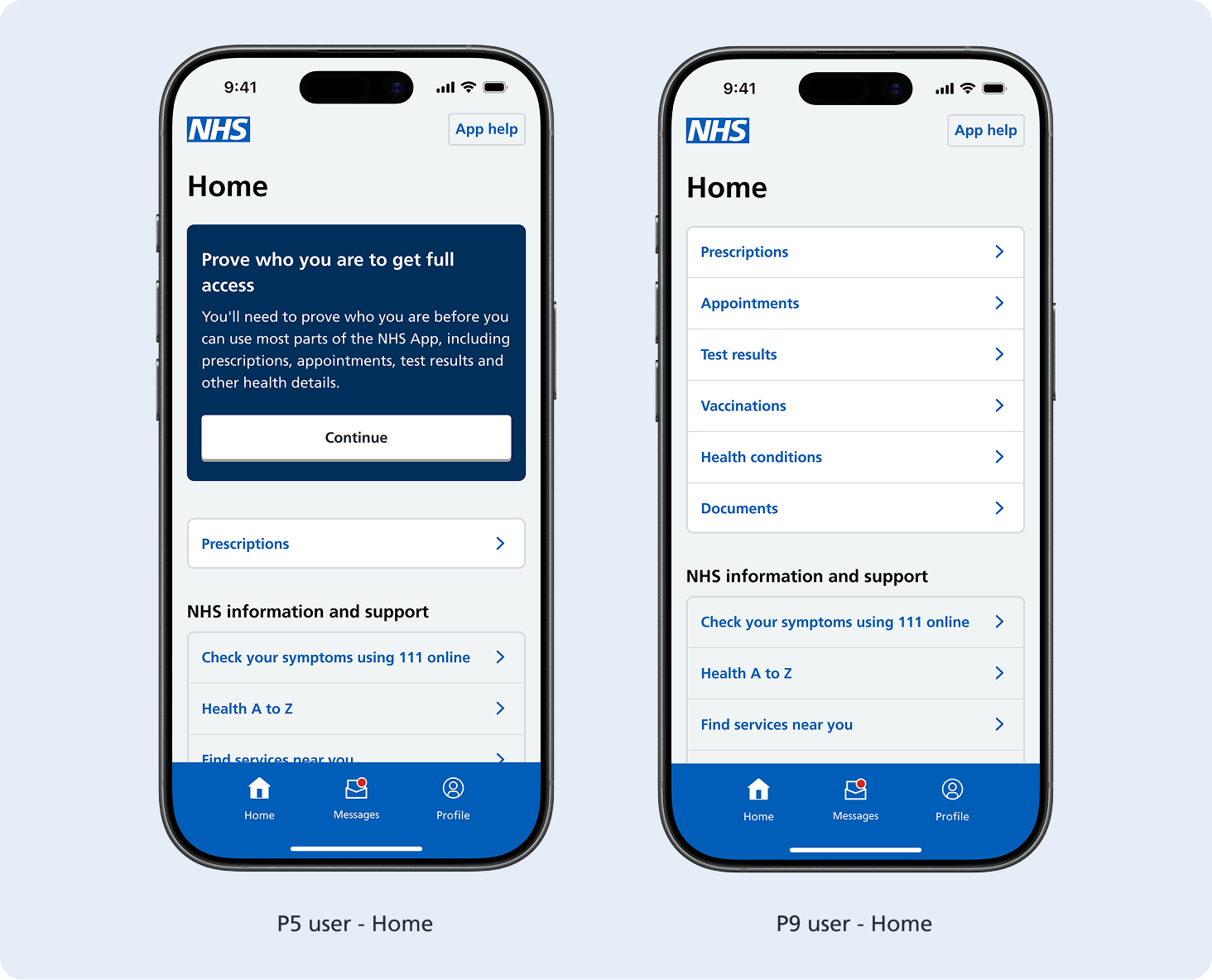
P5 users can access a limited amount of functionality within the NHS App. To gain full access, they will need to prove who they are. They can do this by submitting photo ID or GP surgery registration details.
P9 users have proven their identity and have access to all parts of the NHS App.
Proxy access
If granted, proxy access allows users to switch profiles to manage health services for others in the NHS App. If proxy access has been granted, users can switch profiles in the NHS App to help another person manage their health. This may be a child, relative or partner.
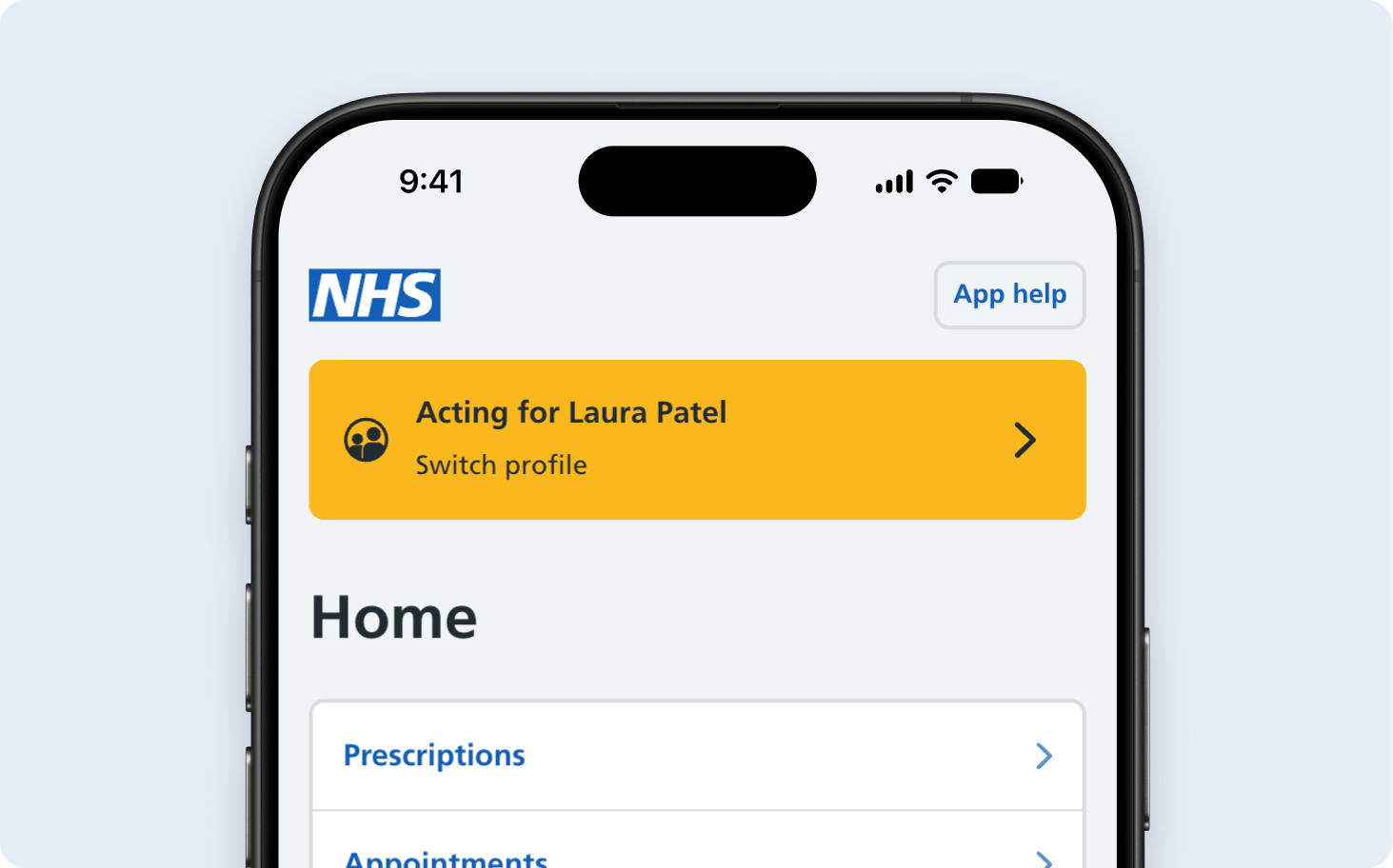
There are only a limited number of journeys available when you act as a proxy user depending on the access level you require or have been granted by your GP surgery. This may include viewing health records, booking appointments and requesting repeat prescriptions.