Integration Guide
2025-10-08 | 📑 1771 words | ⏱ 18 mins | 🧾 History | ✍ NHS Notify | 🔑 NHS Notify
Known Issues / Todo
- ⛅ This page is draft and is subject to rapid change, and may not be fully accurate or complete
About this guide
This guide helps approved letter suppliers to integrate with the NHS Notify Supplier API. The API lets you to:
- get lists of letters allocated to you
- download letter PDFs and metadata
- update and manage letter statuses
- submit and retrieve management information (MI)
The aim of this guide is to help you move smoothly from onboarding to live operation. It explains what you need to do, what we’ll do, and where to get support.
You have 90 calendar days to complete onboarding activities and submit all required evidence of conformity. During this period, the NHS Notify API development team will provide integration support through two one-week integration test windows to help ensure a successful connection and validation against the Supplier API.
Scope of the document
- Pre-onboarding and Conformance
- How the API works
- Prepare your integration
- Build your integration
- Complete integration testing
- Specification proofing before going live
- Apply to go live
- Go live
- Support
Pre-onboarding & Conformance
Before you can begin technical onboarding, your organisation must:
- be an approved NHS letter supplier under the framework agreement
- nominate your technical and operational contacts
Once these steps are completed, you can start preparing your integration.
How the API works
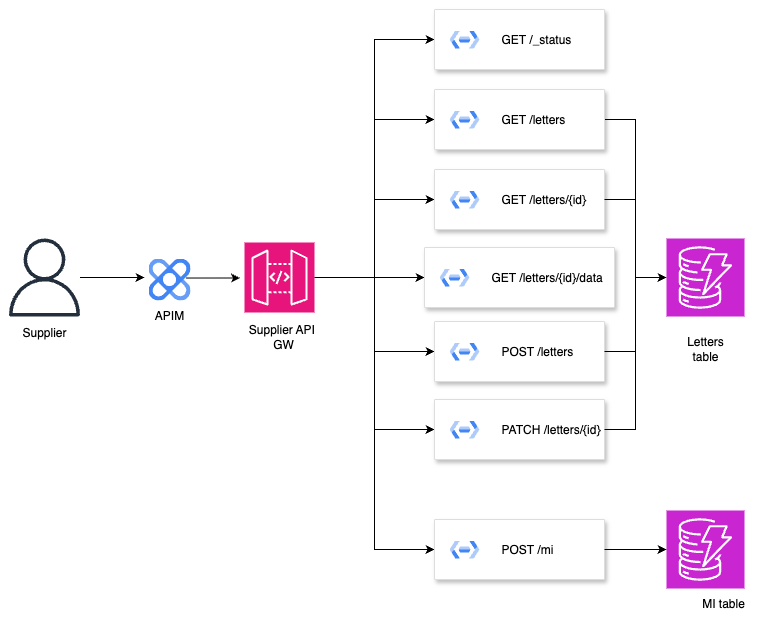
The NHS Notify Supplier API connects your print production systems to NHS Notify so you can securely receive, print, and report on letters.
Letter allocation
When a letter is created in NHS Notify, it’s stored securely as a PDF and allocated to a supplier. This triggers an event to make the letter available for you to retrieve.
List of letters and downloads
Retrieve a list of all available letters, including key details such as the letter ID and current status. The list only contains the summary information - not the actual PDF files. To access each full letter, download the PDF directly by making a request to the /letters/{id}/data endpoint. This will redirect to a short-lived URL to download the file. These links are temporary and expire after about one minute, so downloads should be completed right away or re-requested if the link has expired.
API access
All supplier requests go through NHS API Management (APIM), which handles authentication.
Main endpoints
You will use the API to:
- Retrieve letter lists and PDFs
- Acknowledge receipt
- Update letter statuses
- Submit and validate Management Information (MI)
Event processing and data flow
The API is event-driven. You will need to poll the letters that are allocated to you.
Letter Status
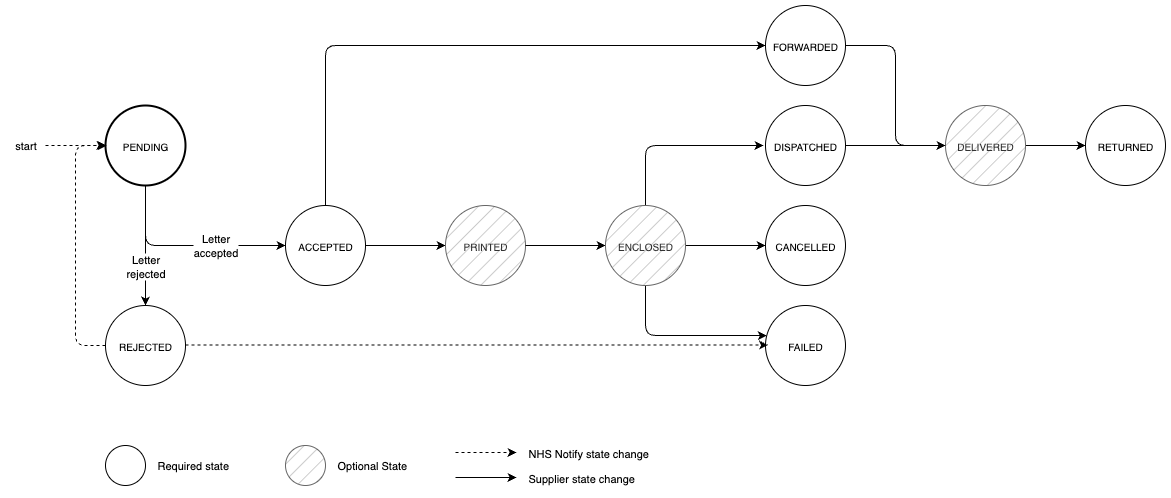
Each letter moves through a defined set of statuses that describe its journey from allocation to final outcome. These statuses provide visibility of where a letter is in its lifecycle - from being assigned to your organisation, through printing and dispatch, to successful delivery or failure.
You are required to update each letter’s status through the API as key processing events occur. The status updates need to be as close to real time as possible. This enables NHS Notify to monitor performance, confirm postal outcomes, and ensure accurate tracking across the Service. State transitions are not currently enforced. Technically, stages can be skipped or reversed. However, reverting an ACCEPTED letter to PENDING or marking a DISPATCHED letter as FAILED is not expected behaviour.
Statuses are categorised as follows:
Core statuses - mandatory updates that represent the key points of a letter’s lifecycle. The mandatory statuses are: ACCEPTED, REJECTED, FORWARDED, DISPATCHED, FAILED, RETURNED, CANCELLED.
- ACCEPTED: The letter has passed validation checks and is ready for production.
- REJECTED: The letter is malformed - for example, the letter ID is not recognised or the associated PDF is missing.
- FORWARDED: The letter requires re-direction to a specialist supplier (e.g. RNIB or another accessible-format partner).
- DISPATCHED: The letter has been handed over to a postal service.
- FAILED: An unrecoverable error occurred during production, preventing the letter from being dispatched.
- RETURNED: The letter was undeliverable and has been returned to sender.
- CANCELLED: The letter was cancelled following a request from the NHS Notify team
Optional statuses - additional, non-mandatory updates that can provide greater operational insight. The optional statuses are: PRINTED, ENCLOSED, DELIVERED, and DESTROYED. These can be used if your internal workflow supports more granular reporting.
- PRINTED: The letter has been printed.
- ENCLOSED: The printed letter and any relevant enclosures have been inserted into the mailing envelope.
- DELIVERED: The letter has been delivered to the patient
Refer to the Letter Status Lifecycle diagram below for the complete sequence of possible transitions, including optional supplier-initiated updates and NHS Notify system-driven outcomes.
Prepare your integration
You must prepare your integration before you can get access to the NHS Notify integration environment. You’ll need technical or developer support to complete tasks in this step.
To set up your APIM application
- Sign in to your NHS Digital developer account
- Create an APIM application
- Select integration test as the environment
- Choose NHS Notify Supplier API (integration environment) as the connected API
You need to inform us by email at england.nhsnotifysuppliers@nhs.net with your APIM Application ID so we can register you to the INT environment.
Once your APIM application has been created and registered, you’ll be granted access to the NHS Notify integration environment. With your technical setup complete and credentials in place, you can now begin building and testing your connection with the NHS Notify Supplier API in a controlled integration setting.
Build your integration
Once you have access to the integration environment, you can begin building and testing your connection with the NHS Notify Supplier API.
How you build your integration to meet your needs is your responsibility.
API specification
The API is defined using the OpenAPI Specification (OAS) format.
You can find it on GitHub and on the NHS England Developer Catalogue.
A Postman collection will also be available in GitHub to explore the requests within the API.
Version control
We may make additive non-breaking changes to the API without notice, for example the addition of fields to a response or new optional fields to a request.
Developer tools and sandbox
To help you get started, we provide a sandbox environment and developer tools to speed up your development.
Sandbox
A safe environment that mirrors the live API using synthetic data. You can test end-to-end workflows without using real patient data.
- Access via APIM: https://sandbox.api.service.nhs.uk/notify-supplier
- Or clone the repository to run a local version
Developer tools
- SDK documentation
- Mock files
- Postman collection
Complete integration testing
Before moving to production, you must complete integration testing using the Acceptance Test Pack.
You (the Supplier) are responsible for
- Leading and managing your testing.
- Ensuring that a test manager or delivery manager is available to oversee progress and reporting.
- Ensuring that a tester or developer is available to run the integration tests.
- Executing all required tests in the Integration (INT) environment.
- Providing evidence for each test case (API responses, logs, print proofs, performance outputs).
- Managing timelines and test cycles to ensure readiness.
- Agreeing two one-week testing windows.
- Letting us know when you’re ready to start testing by writing an email to england.nhsnotifysuppliers@nhs.net
We (NHS Notify) are responsible for
- Providing you with two one-week testing windows for your integration.
- Configuring and maintaining the INT environment.
- Seeding the environment with test data.
- Reviewing your submitted evidence and confirming readiness for production
Specification proofing before going live
Before your service can move into live operation, you must provide proof samples of your letter outputs to demonstrate that they meet the NHS Notify design and production standards.
You’ll need to submit both digital proofs (for content and layout verification) and physical printed samples (for print quality, formatting, and envelope presentation). These proofs will be reviewed by the NHS Notify supplier team to ensure accuracy, consistency, and compliance with the approved specifications.
Only once your proofs have been reviewed and approved will you receive confirmation that your system and outputs are ready to move forward into the live (production) environment.
Digital proof will need to be sent via e-mail using this address: england.nhsnotifysuppliers@nhs.net and physical proof will need to be sent to: Mr Wayne Shirt (NHS Notify), 6th Floor, 7 & 8 Wellington Place, Leeds, West Yorkshire, LS1 4AP.
Apply to go live
Before going live you’ll need to be successful in securing a call off contract.
Once this is signed and you are ready to go live, please inform your supplier manager by writing an email to england.nhsnotifysuppliers@nhs.net
To prepare for go live, you (the Supplier) must provide your production (PROD) application name and Application ID from APIM.
Smoke test
Before we can confirm your go-live, you will run a short smoke test in the production environment with support from the NHS Notify Supplier API team. This checks that your live credentials, connectivity, and print workflow all function correctly end-to-end.
During the smoke test you (the Supplier) will:
- Retrieve and print one or more live letters through the production API.
- Send the output of the specifications to the address provided.
- Confirm reporting - submit a Management Information (MI) update for the smoke-test letter and verify that it’s recorded successfully in NHS Notify
We (NHS Notify) will:
- Configure your access to the production environment.
- Review the smoke-test results and confirm your output meets NHS Notify print specifications
Go live
On your agreed go-live date, you should make live requests to the NHS Notify Supplier API to receive letters for printing.
After go live, the NHS Notify team will
- Run early service support calls to help monitor your integration and ensure everything is working as expected.
- Monitor performance and delivery metrics.
- Provide help through the NHS Notify Support portal
If you find a problem or have a question, contact the Supplier API team by writing an email to england.nhsnotifysuppliers@nhs.net.
Support
Raising issues and questions
If you encounter a bug, unexpected behaviour or have a question about the API, please contact the NHS Notify Supplier API Team at england.nhsnotifysuppliers@nhs.net.
When reporting issues, include as much evidence as possible - such as logs, request/response IDs and timestamps - to help us investigate promptly.
Knowledge sharing
A Q&A page is available for common questions. Please check this page before raising a new query.