Migrating proxy roles to the National service
Legal basis
The transfer of existing linked accounts from GP systems to the National Proxy Service requires a lawful basis to carry out this collection. This is permitted under the National Proxy Service directions to operate the service and a Data Processing Notice (DPN) specific to this one time activity. For more information please contact the Proxy team.
Pre-migration
Proxy role migration criteria
In addition to various pieces of metadata (see FHIR specification guidance for more info), the following information must be provided when migrating a proxy role to the national service (VRS):
| Property | Description |
|---|---|
| Proxy NHS number | The NHS number of the person being authorised to manage services for a patient. All proxy's must have an NHS number in order to support cross-organisation audit. |
| Patient NHS number | The NHS Number of the subject of care. |
| Start date | The date when proxy access was authorised. |
| End date | (Optional) The date when access should end. |
| Status | The status of the proxy role i.e. active. |
| Status reason | The reason for the status i.e. ROLE_CREATED. |
| Grantor | The ODS code of the organisation that authorised the proxy role. |
Only 'active' roles should be migrated
The proxy roles being migrated must be 'active' within the supplier's system. All the roles being migrated to the national service via the VRS POST /Consent endpoint will be set to active status.
Important: Important
The published guidance and usage of primary care systems to support care home access has meant there are linked accounts without an NHS number for the proxy. Additionally there are linked accounts that have been set up without an NHS number for proxies in order to support cross-practice proxy access using supplier patient facing applications.
None of the linked accounts that have been set-up in this way should be migrated to the national proxy service.
An alternate solution for care homes to use professional credentials to access records rather than the inappropriate use of proxy access is being explored. Until such time, suppliers will need to dual run the support for this working practice for care home staff.
Testing
Testing of the migration should be carried out in collaboration with the Proxy team.
- Agree test dataset to be used in the migration testing.
- Agree migration request rate limit.
- Perform as many rounds of testing as needed to verify correct migration behaviour and requests are within the agreed rate limit.
The following exit criteria should be met:
- All agreed test use cases have been completed successfully.
- Both the Proxy team and supplier are able to tally/verify migrated role numbers.
- The supplier test data has mapped to the correct fields within the test National Proxy Store.
- Supplier is able to demonstrate any failed migrations can be retried.
- Assurance documentation has been signed off.
- DOS onboarding has been signed off.
Suppliers are required to conduct testing in the same technical manner as they would for the actual migration. This involves using the POST /Consent endpoint to send proxy roles to the VRS INT environment.
Before testing starts, the Proxy Team will supply each supplier with an additional header. This header must be included in every API request so that they can track which proxy roles have been migrated to the national service during each round of testing.
Migration plan
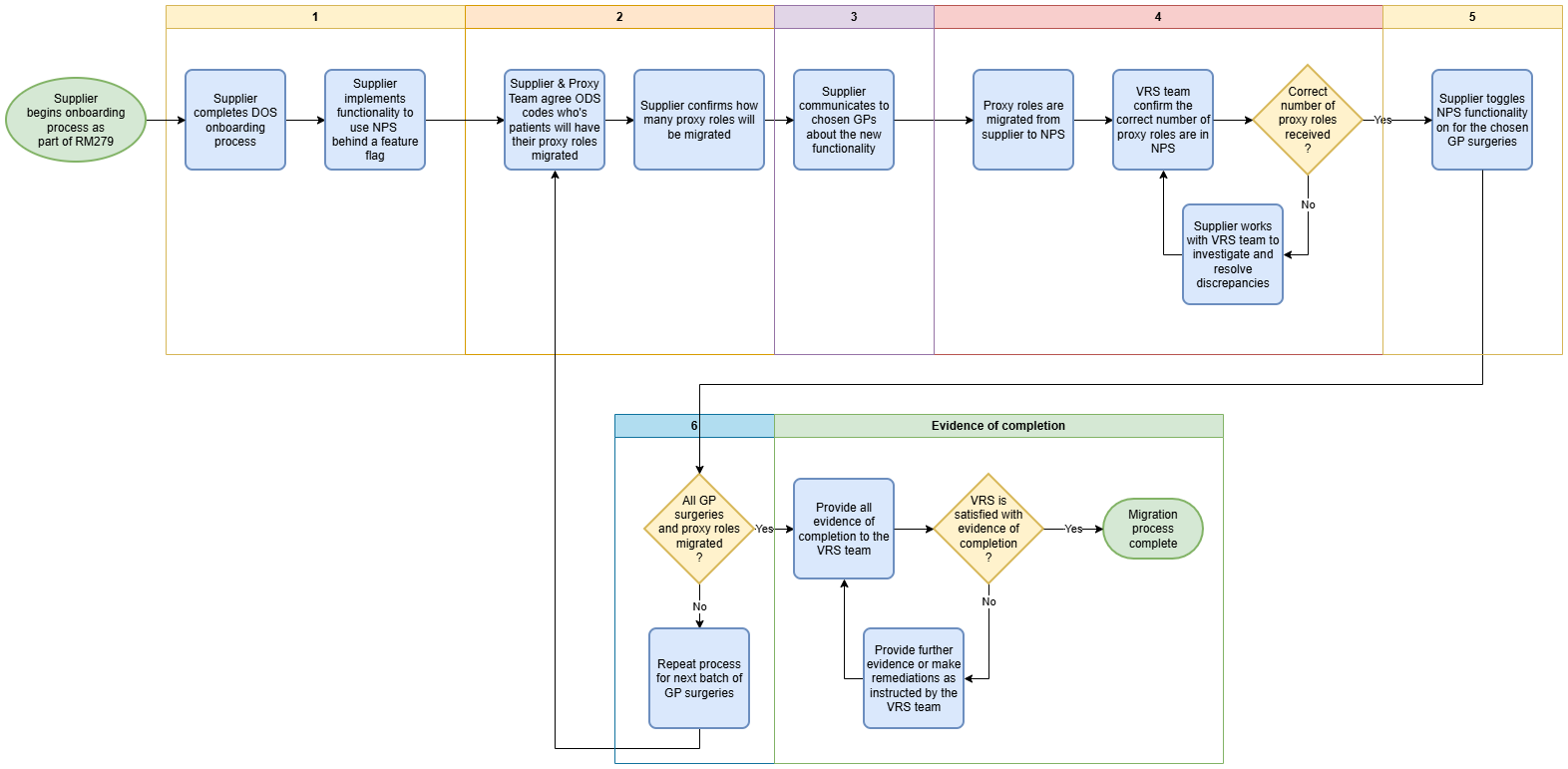
-
Supplier onboards to VRS: A supplier must complete the DOS assurance process to onboard onto VRS. Testing their integration in the INT environment before being granted access to the production environment. All functionality on the supplier system that uses the national service, and it's constituent parts should be toggled off for all users in Production at this stage.
-
ODS codes for migration are selected: The supplier and Proxy team agree a set of ODS codes for each migration batch. All proxy roles for patients and proxies that are registered with the chosen ODS code will be migrated.
-
Supplier comms to GPs: The supplier sends out comms to each GP surgery being migrated (in step 2), informing them of the details about the new functionality and when this will be turned on.
-
Proxy role migration: During an agreed time window, typically at a weekend or period of low/no traffic, all proxy roles identified in step 2 are migrated to the national service using the VRS
POST /Consentendpoint. Once complete, the Proxy team will confirm the number of proxy roles in uploaded for each ODS code so these can be verified against supplier expected numbers. -
Supplier functionality is toggled on: After the Proxy team have confirmed that the proxy roles have been migrated correctly, the supplier toggles on the proxy functionality for the given GP surgeries. From that point onwards, the supplier system will get, create, and update proxy roles in the national service for the enabled ODS codes.
-
Repeat steps 2-5 for rollout: After successful completion of steps 2-5 for one batch of proxy roles, this should be completed for all other proxy roles in batches agreed with the Proxy team.
Handling conflicts with existing proxy roles
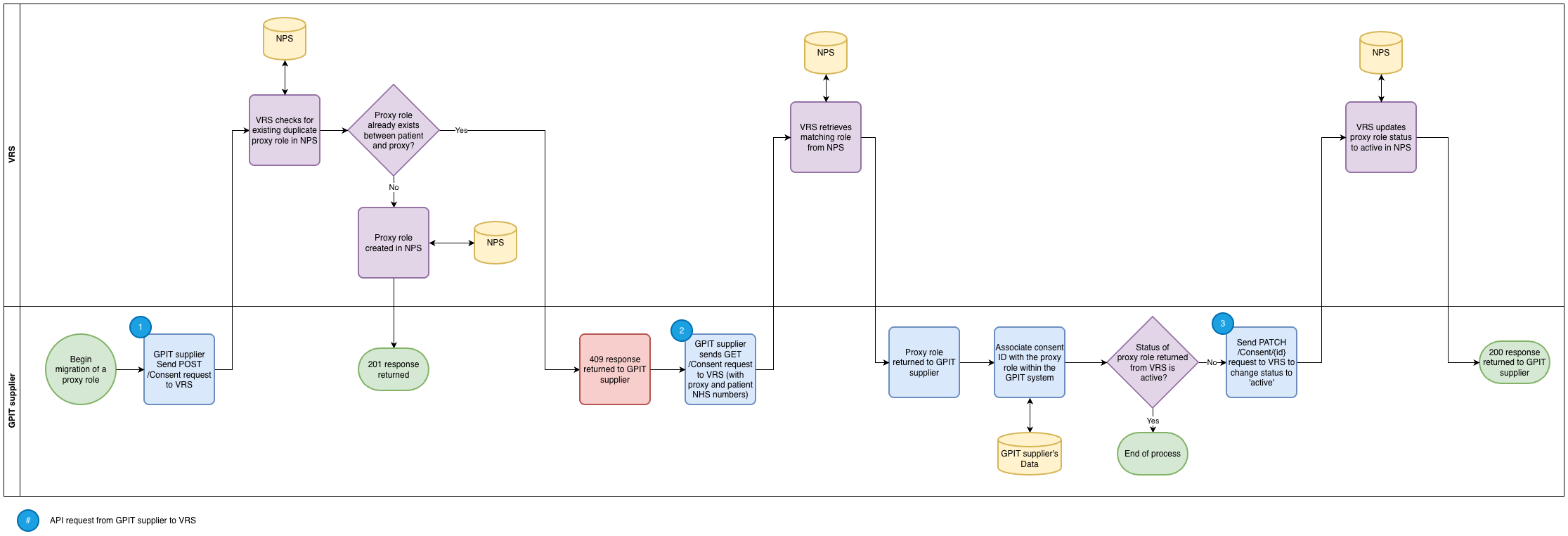
If a patient and/or their related proxy has moved from a practice using one supplier (supplier A) to another (supplier B), their proxy role may have already been migrated to the national service by supplier A. In this case, a POST /Consent request to VRS for the same patient and proxy will cause a 409 error to be returned.
In this instance, supplier B must do a GET /Consent request to VRS to retrieve this existing proxy role from the national service and store the role ID within their system against the role they attempted to migrate.
If the response from VRS showed that the proxy role status is 'inactive', supplier B must send a PATCH /Consent/{id} request to VRS to update this status to 'active'.
Post-migration
Reactivating inactive roles
If a supplier has been requested to reactivate an inactive role within their system, and do not have an ID from the national service for that proxy role, they should send a POST /Consent request to VRS to create it as active.
When doing this, if a 409 duplicate response is returned from VRS, they should follow the process outlined above in the 'Handling conflicts with proxy roles' section.
Edit this page on GitHub