Enable proxy access to services
Proxy access to national services is primarily enabled through NHS login, which provides identity assurance and delegated access capabilities for patient-facing applications.
NHS login acts as the federated identity provider for national services. It supports:
- Authentication of the individual user
- Verification of identity to the appropriate level of assurance
- Representation of delegated (proxy) roles
- Secure token issuance for API access
By federating identity and delegation through NHS login, services can rely on a consistent, nationally governed mechanism for determining:
- Who the authenticated user is
- Whether they are acting on their own behalf or as a proxy
- Which patient context applies to subsequent API calls
This approach avoids the need for individual services to implement their own proxy role management and identity verification.
Fundamental steps of a proxy user journey
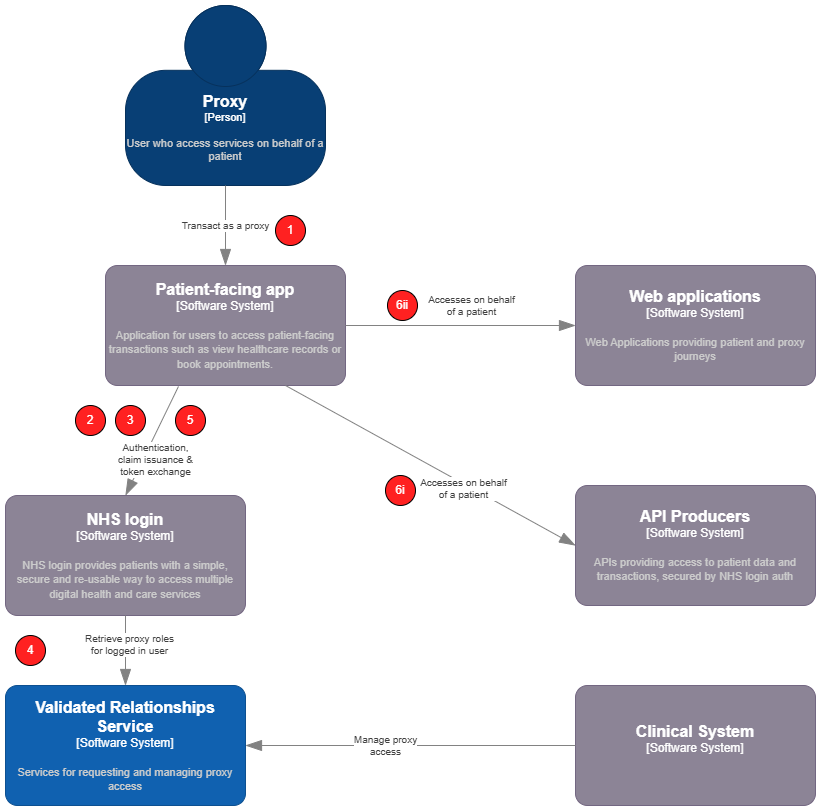
When delivering a user journey to enable a proxy to manage services on behalf of a patient, the high-level steps are:

Steps 1-3 will be consistent for all proxy journeys. Step 4 may vary depending on the nature of the transaction that the user wishes to complete.
Logical Architecture & sequence
-
A logged-in user of a patient facing service begins a proxy journey.
-
The patient-facing app (PFS) must request
delegationscope when initiating the auth code flow to authenticate the user. -
The PFS will then use the issued access token to query NHS login's
/UserInfoendpoint. This will trigger NHS login to retrieve all active proxy roles for the logged in user from the Validated Relationships Service (VRS). These are returned as claims in thedelegationsarray in the response payload and can be presented to the user for selection. -
When NHS login retrieves proxy roles, it uses the
GET /Consentendpoint. -
The user selects who they would like to "switch to" in the app. The PFS must then perform a token exchange with NHS login. NHS login will issue a composite identity token detailing the
subject and theactor, the patient and proxy respectively. This token can then be exchanged for an access token as needed. -
The user performs a transaction on behalf of the patient they are proxying for. (i) API Variant: the PFS performs a token exchange by calling
/oauth2/tokenon the Authorization server to exchange the composite identity token for an access token. The access token is then used in requests to an API in theAuthorizationheader (bearer token). The API will verify the token and process the request in the context of the subject in the token, auditing the request appropriately i.e. that the user has performed an action on behalf of the patient. (ii) Web application Variant: the user is redirected to an external web application or "web jump off", remaining logged in as a result of an SSO handshake. In doing so the PFS passes the composite identity token in the initial request to the external web application. This is then verified with NHS login through the standard SSO process as described by the NHS login documentation. The external web application can then provide a logged in experience for the user and use the claims in the token (e.g. NHS number of proxy or patient and demographics of each) as needed.
Detailed sequence diagrams
Given the two fundamental variants of delivering a proxy user journey (API & Web "jump off"), the below captures the steps involved for each.
Where there is variation from the standard process of integrating with NHS login or an API for the logged in user, these steps are highlighted in green.
1. Common steps
These initial steps are common to both variants of delivering a proxy user journey.
sequenceDiagram
  autonumber
  actor U as User/Proxy
  participant App as Patient-facing app
  participant Login as NHS login
  participant VRS as Validated Relationships <br /> Service (VRS)

  U->>App: Launch application
  rect rgba(0, 150, 100, .3)
      App-->>U: Redirect to authentication (App must request delegation scope in required claims)
      U->>Login: Redirect to authentication (delegation scope requested)
  end
  Login-->>U: Display sign-in page
  U->>Login: Sign in
  Login-->>App: Redirect with authorisation code
  App->>Login: Exchange code (/oauth2/token)
  Login-->>App: Return access token + ID token
  App-->>U: Display home page
  rect rgba(0, 150, 100, .3)
      U->>App: View approved proxy roles
      App->>Login: Get user info (/userinfo with identity provider access token)
      Login->>VRS: Get active proxy roles for user (/consent)
      VRS-->>Login: Return active proxy roles
      Login-->>App: Return user info (with delegations - one per proxy role)
      App -->>U: Display list of patients (the delegation claims)
      U->>App: Select a patient
      App->>Login: Perform token exchange (using /oauth2/token) to get composite token <br /> incl. NHS number of the patient and logged-in users identity token
      Login-->>App: Return composite token (sub: patent, act: proxy user's base64 encoded identity token)
      App-->>U: Display available proxy journeys
  end
  note over U,App: Steps for web jump off or API integration follow, depending on the transaction
2.1 Web app jump off steps
The steps described below follow those captured in (1) above when transitioning from one web application to another via SSO.
sequenceDiagram
  autonumber
  actor U as User/Proxy
  participant App as Patient-facing app
  participant Login as NHS login
  participant App2 as External Web App

  note over U,App: Preceded by common steps
  U->>App: do something that requires navigation to another web application
  rect rgba(0, 150, 100, .3)
    note over App: Using values from the composite identity token <br/>and not the logged-in users identity token
    App->>App: generate signed jwt to support SSO flow
  end
  note over U,App: These are the standard SSO steps as described in NHS login documentation
  App-->>U: redirect to the external web application URL <br/> appending `asserted_login_identity=<jwt>` query string on the URL
  U->>App2: redirect to external web application
  App2->>Login: oidc request + asserted_login_identity
  Login->>Login: Verify the request
  Login-->>App2: Redirect with authorisation code
  App2->>Login: Exchange code (/oauth2/token)
  Login-->>App2: Return access token + ID token
  rect rgba(0, 150, 100, .3)
    note over U,App: External web application has claims relating <br /> to both proxy and patient available in the the token
    App2-->>U: Present logged-in experience to user acting as a proxy
  end
2.2 External API steps
The steps described below follow those captured in (1) above. In order to deliver a proxy journey whereby your patient-facing application uses external APIs to read or write data pertaining to a patient but carried out by a proxy, you can follow the steps outline below.
The below sequence diagram illustrates how the various components interact in order for a proxy user to complete a task involving an external API on behalf of a patient. The flow follows the standard auth flow described in User-restricted RESTful APIs - NHS login separate authentication and authorisation.
sequenceDiagram
  autonumber
  actor U as User/Proxy
  participant App as Patient-facing app
  participant AS as Authorisation server
  participant API as User-restricted API

  note over U,App: Preceded by common steps

  U->>App: do something that requires access to an API on behalf of a patient
  rect rgba(0, 150, 100, .3)
    note over AS: This is an exchange of the composite identity token <br/>and not the logged-in users identity token <br/>for normal flows for "self access"
    App->>AS: Exchange composite identity token for an access token using Authorization server (/oauth2/token)
  end
  AS-->>App: Return access token
  App->>API: Call user-restricted API <br/> (with access token in header `Authorization: bearer <access_token>`)
  rect rgba(0, 150, 100, .3)
      API->>API: Audit proxy performing the transaction
      API-->>App: Return response
      App-->>U: Display patient related data to the proxy user
  end
Related documentation
This documentation is meant to act as a guide for how to implement the proxy access workflow into your application. For concrete integration guidance and specifications for the requisite APIs and onboarding processes, you can refer to the following:
- NHS login developer documentation
- User-restricted RESTful APIs - NHS login separate authentication and authorisation
Edit this page on GitHub